Best overall: a compact native-1080p projector that fits your measured placement; best for shallow rooms: a short-throw projector; best budget-focused choice: a basic native-720p projector for dark-room viewing. This 2026 guide helps Hottertronics shoppers choose by room fit, source compatibility, and setup needs rather than advertised image size.
- The best mini projector for small apartment use fits your available projection distance before anything else.
- Hottertronics shoppers should prioritize native resolution, documented brightness, and compatible connections over headline screen size.
- Choose short throw for shallow rooms; choose battery power only when moving without an outlet matters.
- Check fan noise, speaker connections, mounting needs, and streaming-device compatibility before buying.
Why this matters
A small projector does not automatically produce a useful picture in a small apartment. The case can fit on your shelf while the lens needs more distance than your room provides. A large advertised image also says little about how readable that image will be with your lamps on.
Buy for the space you have, not the largest picture on the listing. For Hottertronics shoppers, the best mini projector for small apartment use is the one that fits the room and connects to the devices already in use.
The recommendations below rank buying configurations, not individual models. Each configuration solves a different apartment problem, so you can narrow your search before comparing product specifications.
What makes the best mini projector for a small apartment?
Use these six criteria to evaluate a projector in 2026. Apply them in this order: a sharper image cannot fix an impossible placement.
- Projection fit: Check the required lens-to-wall distance for your intended image width. Use the manufacturer's throw information, not the product's physical dimensions.
- Usable brightness: Look for a stated measurement method, such as ANSI or ISO lumens. Do not treat unrelated brightness labels as directly comparable.
- Native resolution: Native resolution describes the pixels the projector displays. Supported input resolution describes signals it accepts; the two are not interchangeable.
- Source compatibility: Confirm the video connection and the intended streaming method. Bluetooth connectivity alone does not establish video compatibility.
- Bedroom practicality: Check fan-noise documentation, speaker placement, focus adjustment, ventilation, and whether the controls remain accessible on your shelf.
- Complete setup: Account for a stand, screen, adapter, external source, audio equipment, and power arrangements when needed. Compare complete setups, not just projector listings.
Small-apartment projector choices at a glance
| Rank and configuration | Best for | Standout feature to seek | Key limitation |
|---|---|---|---|
| 1. Compact native-1080p projector | Regular evening viewing with enough projection distance | Native detail and documented room fit | Compact size does not guarantee short throw |
| 2. Short-throw projector | Shallow rooms with limited lens-to-wall distance | A large image from a shorter distance | Placement and surface alignment still matter |
| 3. Basic native-720p projector | Occasional viewing in a dark room | A simple feature set matched to a modest use case | Less native detail than 1080p |
| 4. Battery-powered portable projector | Moving between rooms without relying on a nearby outlet | Cord-free operation when supported | Battery use adds charging and runtime checks |
These options overlap. A short-throw projector can also have native 1080p resolution, and a portable model can use mains power. Choose the configuration that addresses your hardest constraint first, then assess the remaining specifications.
1. Compact native-1080p: best for regular evening viewing
A compact native-1080p projector is the default starting point when your apartment has enough projection distance. Native 1080p means a display resolution of 1920 × 1080 pixels; it does not guarantee brightness, contrast, quiet operation, or good focus.
This configuration suits a repeatable setup: the same shelf, the same wall, and the same viewing position. Keeping those positions consistent reduces the need to reposition and refocus before every film.
Compact native-1080p projector pros
- More native image detail than a 1280 × 720-pixel display.
- A fixed location simplifies everyday setup.
- A sensible starting point for films, subtitles, and connected video sources when compatibility is confirmed.
Compact native-1080p projector cons
- A small housing does not establish the required projection distance.
- Native resolution does not establish usable brightness with room lights on.
- Fan placement and ventilation can limit where the projector sits.
Best for: You watch regularly after dark and can leave the projector in a suitable position.
Before buying in 2026, confirm that “1080p” refers to native resolution rather than accepted input. Then check the image-size range at your actual shelf position. Do not accept resolution as a substitute for those placement details.
Verdict: Buy this configuration when its documented throw fits your room.
2. Short throw: best for shallow rooms
A short-throw projector produces a given image width from a shorter distance than a longer-throw design. That makes projection geometry the main reason to consider it—not the assumption that every short-throw model is small or easy to install.
Short throw is useful when a couch, doorway, or walkway prevents you from placing a projector farther back. Check the specific model's distance chart because the category name alone does not establish its placement requirements.
Short-throw projector pros
- Addresses limited lens-to-wall distance directly.
- Gives you another placement option when a rear shelf is impractical.
- Can keep the projector nearer the display surface rather than behind your seating.
Short-throw projector cons
- Surface flatness and alignment still affect the picture.
- A nearby table or cabinet can occupy space you need for other uses.
- Short throw does not establish native resolution, brightness, or audio quality.
Best for: Your intended image will not fit from the available distance with a conventional projector.
Measure the furniture footprint as well as the optical distance. A projector positioned close to the wall still needs a safe, ventilated location where nobody will knock it out of alignment.
Verdict: Buy short throw when measured room depth rules out your other choices.
3. Basic native-720p: best for occasional dark-room viewing
A native-720p projector displays 1280 × 720 pixels. It is a lower-detail option than native 1080p, so consider it for occasional viewing rather than treating it as an equivalent replacement.
For a budget-focused 2026 purchase, simpler requirements are more useful than a long feature list. Compare this configuration only after deciding that reduced detail is acceptable for your image size, seating position, and content.
Basic native-720p projector pros
- Gives casual viewing a clear specification baseline.
- Lets you focus on essential connections rather than unused extras.
- Can suit video viewing where fine text detail is not your priority.
Basic native-720p projector cons
- Displays less native detail than 1080p.
- Small text and subtitles deserve close attention before purchase.
- Lower resolution does not guarantee lower fan noise or easier placement.
Best for: You want occasional evening entertainment and accept the resolution trade-off.
Do not assume this category is automatically the better value. Compare the complete setup and verified specifications against native-1080p alternatives. A simpler projector stops being a useful compromise if it requires accessories that do not suit your needs.
Verdict: Buy only if reduced detail is an acceptable compromise; otherwise skip.
4. Battery-powered portable: best for moving between rooms
A battery-powered portable projector is worth considering when you regularly change viewing locations or lack a convenient outlet at the intended position. Confirm that the model actually includes a battery; “portable” can describe size alone.
Portability also involves the source device, audio connection, and supporting surface. A projector is not a self-contained entertainment system merely because you can carry it in one hand.
Battery-powered portable projector pros
- Supports placement without a nearby outlet during battery operation.
- Suits moving between a bedroom and another viewing space.
- Avoids a permanent installation when your layout changes often.
Battery-powered portable projector cons
- Battery operation requires charging and runtime planning.
- Image settings can differ between battery and mains operation.
- External sources and speakers can make the setup less portable.
Best for: Moving the projector is part of your actual routine, not just an appealing possibility.
For 2026 comparisons, check the conditions behind any stated battery runtime. Confirm the operating mode, charging method, and whether your planned video source needs separate power. Evaluate the whole arrangement you will carry.
Verdict: Buy for a genuine outlet or mobility need; skip battery features for a fixed shelf setup.
Measure the room before choosing the projector
Start at the lens position, not the back of the shelf. Throw ratio is projection distance divided by image width, with both measurements expressed in the same unit.
For a geometry example—not a product specification—a throw ratio of 1.2:1 requires 1.2 meters of projection distance for an image 1 meter wide. If you want that image to be 1.5 meters wide, the same ratio requires 1.8 meters of distance.
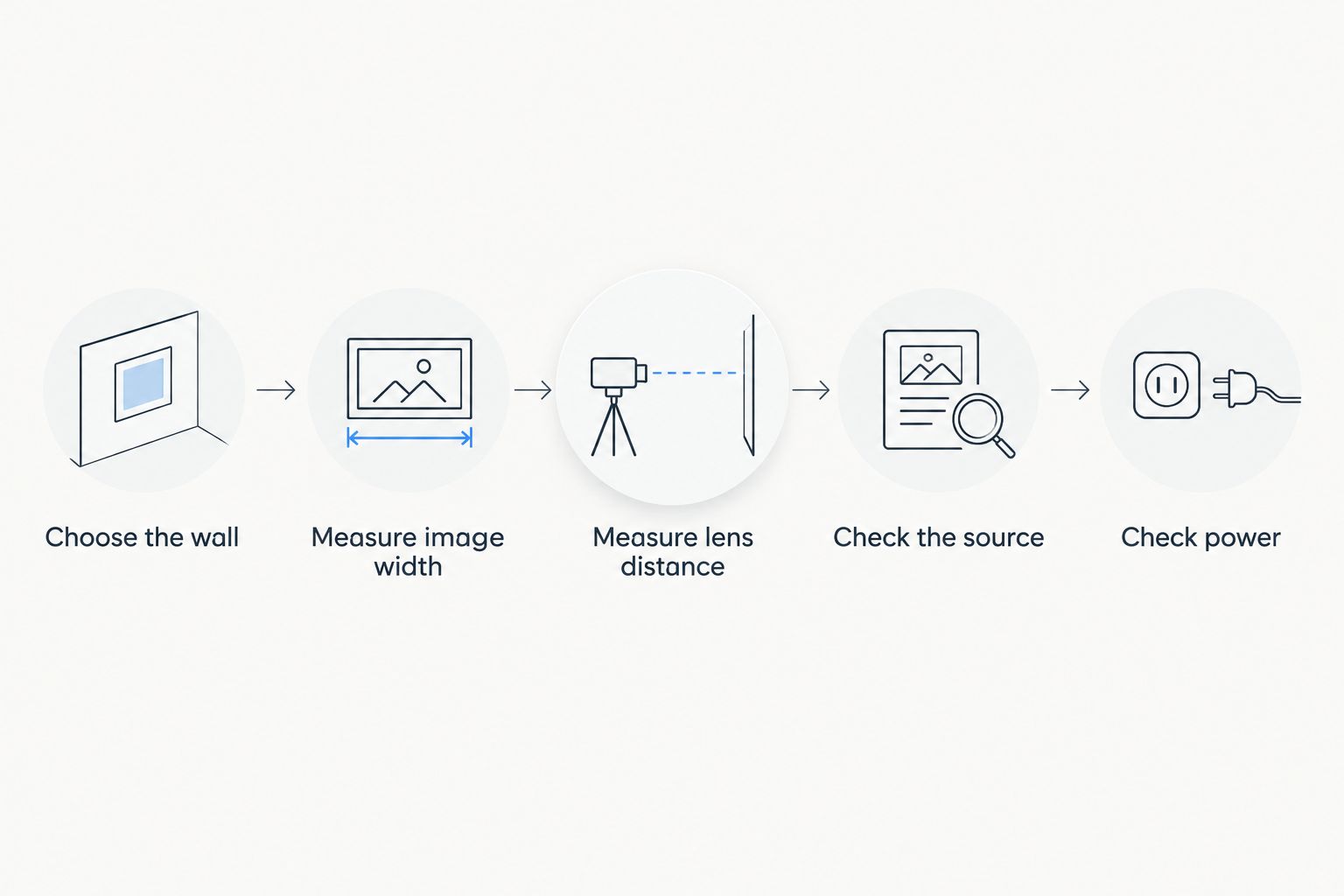
Use this sequence before comparing models:
- Choose the wall: Identify a clear surface without shelves, switches, or objects crossing the picture.
- Measure image width: Decide how much horizontal space the picture can occupy.
- Measure lens distance: Locate a practical support position and measure from the proposed lens location.
- Check the source: Confirm how your phone, laptop, console, or streaming device will send video.
- Check power: Include power for the projector and any separate source or speaker.
A wall's available width is not the same as an advertised diagonal image size. Keep those measurements separate. Also check the manufacturer's ventilation guidance before treating a narrow shelf or enclosed cabinet as a suitable location.
Check compatibility before you buy
A connection label is not a complete compatibility answer. Identify the exact device and content service you intend to use, then confirm the supported route from that source to the projector.
- HDMI: Confirm the projector's input and whether your source needs an adapter or separate power.
- USB: Check its stated purpose. A USB port can serve power, media playback, or another function; the connector alone does not establish video input.
- Wireless mirroring: Confirm device support and the intended content service. Protected streaming content can have restrictions that ordinary screen mirroring does not solve.
- Built-in apps: Check support for the services you use rather than assuming every app is included.
- Audio: Confirm whether Bluetooth handles audio input or output and whether a wired speaker connection is supported.
For bedroom viewing, check where the fan will sit relative to your pillow or seating. A noise figure without its measurement conditions is not enough to compare two projectors confidently. Avoid placing the projector beside your head simply because that shelf is convenient.
How the configurations are ranked
The ranking prioritizes room fit, usable image specifications, source compatibility, and setup practicality. Compact native 1080p is the default because it offers more native detail than 720p, but short throw takes priority when room depth is the deciding constraint.
Battery operation ranks as a situational feature, not an automatic upgrade. The right purchase removes a real obstacle. It does not add a capability you never use.
Which mini projector should you choose?
Start with a compact native-1080p projector, then reject any model that fails your placement or compatibility checks. Move to short throw if your available distance is the obstacle. Consider native 720p only if you accept its lower detail, and battery power only if your setup needs it.
For a 2026 shortlist, write down your image width, lens distance, source device, and intended lighting conditions. Those requirements give you a firmer buying decision than a maximum-image claim or an unexplained brightness number.
FAQ
What's the best mini projector for a small apartment?
A compact native-1080p projector is the best starting configuration when its documented projection distance fits your room. Choose short throw instead when limited room depth prevents your intended image size.
Is a short-throw projector better for a small bedroom?
A short-throw projector is better when you need your intended image from a shorter lens-to-wall distance. Check the specific model's placement chart and supporting furniture footprint before buying.
Is native 720p enough for occasional bedroom viewing?
Native 720p is an option when you accept less detail than native 1080p. Assess subtitles, image size, and seating distance rather than assuming all video will look equally clear.
Does 1080p support mean a projector has native 1080p resolution?
No. Supported 1080p input means the projector accepts that signal; native resolution describes the pixels it actually displays. Check for an explicit native-resolution specification.
Can I stream movies from my phone to a mini projector?
You can stream from your phone when the phone, projector, connection method, and content service support the intended setup. Wireless mirroring alone does not establish compatibility with protected streaming content.
Do I need a screen for an apartment projector?
A screen is not automatically required, but the projection surface affects the picture. Check wall texture, color, flatness, and obstructions before deciding whether a separate screen is useful.
Should I choose a battery-powered mini projector?
Choose battery power when moving between rooms or operating away from an outlet matters to you. Confirm runtime conditions and power requirements for any separate video source before buying.
One last thing
Try a smaller image before adding more equipment. Spreading the same projected light over a smaller area increases illumination on that area, although it does not change the projector's light output or native resolution.
Mark your intended picture boundaries with removable tape before ordering. Sit where you will actually watch, check the sightline, and trace the cable route. A modest picture that fits your apartment is a better purchase than a larger setup that blocks everyday life.