Best overall: a native 1080p mini projector with HDMI. Best for a shallow bedroom: a compact short-throw model. Best for a simple setup: an HDMI-first model without built-in streaming. This 2026 guide ranks projector types by bedroom use, so you can choose the right features before choosing a model.
- The best mini projector for bedroom movies combines verified native resolution, suitable placement, and compatible streaming connections.
- For Hottertronics shoppers, an HDMI-first mini projector is the default when an existing streaming device handles movie apps.
- Choose short throw for limited placement depth, not simply because a projector is small.
- Check fan noise, power requirements, audio connections, and focus before buying.
Why this matters
A projector can fit on your bedside table and still be wrong for your bedroom. The lens needs the right distance from the wall, the picture needs manageable room lighting, and your streaming source needs a working connection.
For Hottertronics shoppers, the best bedroom mini projector is one that works with the streaming device and placement you already use. Start with your room, then compare listings at Hottertronics against the checks below.
The recommendations here are buying categories, not model-specific awards. Each category solves a different problem; features such as native resolution, short throw, and battery power can overlap in the same projector.
What makes the best mini projector for bedroom movies?
Use these criteria to judge any 2026 shortlist before getting distracted by app icons or a large advertised image size.
- Native resolution: Check the projector's actual display resolution, not just the video formats it accepts. Native 1080p means 1920 × 1080 pixels; native 720p means 1280 × 720 pixels.
- Brightness reporting: Compare measurements reported under the same standard, such as ANSI lumens. Do not treat an unspecified brightness figure as equivalent to a standardized measurement.
- Placement fit: Check throw distance, image size at that distance, focus range, and mounting requirements. Small dimensions do not establish short-throw capability.
- Source compatibility: Verify HDMI inputs, required adapters, power connections, and support for your intended streaming service. Wireless casting and built-in apps are separate features.
- Bedroom comfort: Look for documented fan-noise information, accessible controls, and an audio connection that suits your headphones or speaker.
- Complete setup: Account for any streaming device, stand, screen, adapter, or audio equipment the setup requires. An incomplete bundle is not a complete buying decision.
Bedroom mini projectors at a glance
| Rank and projector type | Best for | Standout feature to verify | Key limitation |
|---|---|---|---|
| 1. Native 1080p HDMI projector | A fixed bedside movie setup | Actual 1920 × 1080-pixel display resolution | Needs suitable power, placement, and a video source |
| 2. Compact short-throw projector | Shallow rooms with limited placement depth | Required image size from your available distance | Small size alone does not mean short throw |
| 3. Battery-powered mini projector | Moving between viewing positions | Documented battery operation during video playback | Requires charging and battery-runtime checks |
| 4. Smart mini projector | Buyers who want onboard streaming | Exact app and playback support | App icons do not establish service compatibility |
| 5. Basic native 720p HDMI projector | Occasional viewing with modest detail needs | Honest native resolution and a straightforward input | Less image detail than native 1080p |
1. Native 1080p HDMI projector: best for a fixed bedside setup
A native 1080p HDMI projector is the strongest starting point for a bedroom movie setup with a power outlet nearby. HDMI gives you a defined connection to a compatible streaming device, console, or laptop, rather than making wireless casting the foundation of the setup.
The important word is native. A projector that accepts a 1080p signal does not necessarily display 1920 × 1080 pixels. Also check whether the lens can produce your intended picture size from the shelf or table you plan to use.
Native 1080p HDMI projector pros:
- Native 1080p provides more image detail than native 720p.
- HDMI lets a separate compatible device handle streaming apps.
- A fixed position removes the need to rearrange the projector each night.
Native 1080p HDMI projector cons:
- HDMI does not remove the need for source-device compatibility checks.
- Power and video cables need a practical route around the bed.
- Resolution alone does not establish brightness, contrast, or quiet operation.
Best for: You watch regularly from the same bed position and can leave the equipment connected.
Before buying in 2026, verify native resolution, HDMI compatibility, focus controls, and the distance-to-image-size specification. Give those facts priority over decorative lighting or vague cinema claims.
Verdict: Buy this type as the default for a fixed bedroom setup.
2. Compact short-throw projector: best for shallow bedrooms
A short-throw projector produces a given image size from a shorter distance than a conventional longer-throw design. That makes throw distance relevant when the only usable surface sits close to the viewing wall.
Measure from the proposed lens position to the wall, not from the back of the projector. Then compare that measurement with the manufacturer's image-size chart or throw-ratio specification.
Compact short-throw projector pros:
- Short-throw optics address limited projection distance.
- A closer position can keep equipment away from the bed's headboard.
- A documented throw chart lets you check room fit before ordering.
Compact short-throw projector cons:
- Compact dimensions do not prove the lens is short throw.
- The required mounting height and angle still need checking.
- A close position does not correct an uneven projection surface.
Best for: Your available projection distance rules out the image size you want from a conventional design.
Do not choose short throw solely because the room is called a bedroom. Choose it because the lens-to-wall measurement demands it. If a conventional projector fits, short throw is not automatically the better choice.
Verdict: Buy only when the documented throw distance solves your placement problem.
Check the room before choosing the projector
For a 2026 bedroom shortlist, settle the physical setup before comparing convenience features. Otherwise, you risk choosing a projector whose best position blocks a walkway, stretches a cable across the floor, or leaves the picture off-center.
- Measure placement: Record the available lens-to-wall distance and usable surface area.
- Check the wall: Look for texture, strong color, obstructions, and light falling on the image area.
- Trace connections: Identify the power outlet, video source, and cable route.
- Plan audio: Decide whether sound will come from the projector, an external speaker, or headphones.
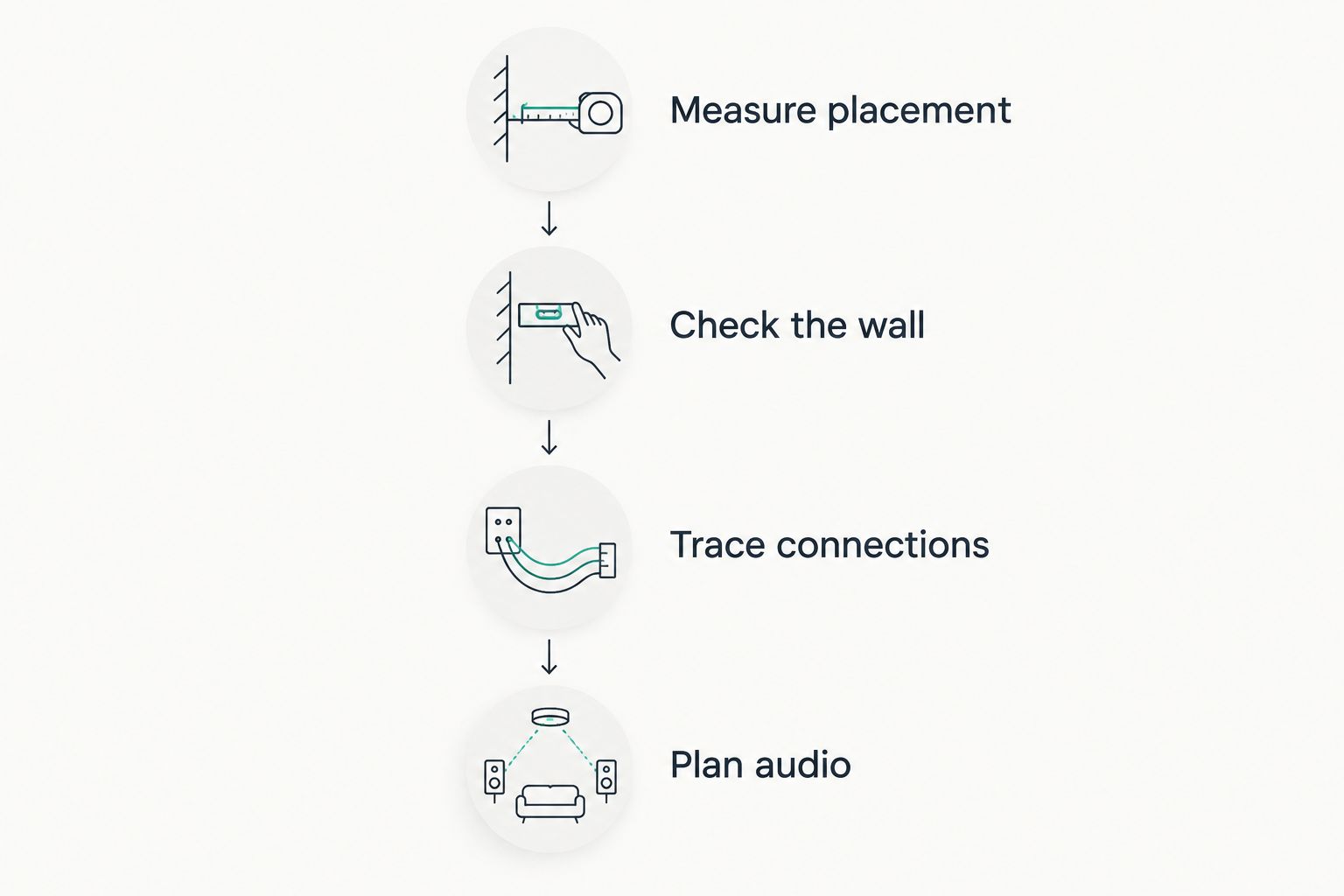
Keep the lens as square to the viewing surface as the setup permits. Keystone correction reshapes an angled image digitally; it does not move the projector into a better physical position. Check focus across the picture, not just at the center.
3. Battery-powered mini projector: best for changing positions
A battery-powered mini projector suits a setup that moves between usable viewing positions without a nearby power connection. The feature to verify is actual video playback on battery power, not simply a USB-shaped charging port.
Read the operating conditions attached to any runtime claim. Brightness mode, wireless functions, and connected accessories can affect how a battery-powered setup operates.
Battery-powered mini projector pros:
- Battery operation removes the projector's wall-power cable during use.
- You can reposition the projector without first finding another outlet.
- It suits temporary setups that you pack away after viewing.
Battery-powered mini projector cons:
- Charging becomes part of the viewing routine.
- Runtime must cover your intended viewing session.
- A separate streaming device can still need its own power supply.
Best for: You genuinely change positions or use a temporary setup away from an outlet.
Check whether your intended source works while the projector runs on its battery. A cordless projector paired with a wall-powered source is not a fully cordless movie setup.
Verdict: Buy for mobility; skip battery power as a priority for a permanently connected bedside setup.
4. Smart mini projector: best for onboard streaming
A smart mini projector includes software for functions such as streaming or media playback. The useful question is not whether it is smart, but whether the exact model supports the service and playback method you intend to use.
For your 2026 purchase, verify service support in the model's current documentation. A familiar app logo, a browser, and wireless screen mirroring are not interchangeable ways to watch a subscription service.
Smart mini projector pros:
- Supported onboard apps reduce dependence on an external video source.
- One remote can simplify supported playback functions.
- Integrated streaming can reduce the number of connected devices.
Smart mini projector cons:
- Each intended service needs a compatibility check.
- Software support and update policies require separate verification.
- Built-in streaming does not establish picture quality or quiet operation.
Best for: You want onboard streaming and can confirm support for the services you actually watch.
Check whether the projector also has a suitable external video input. That gives you another connection method if you prefer a separate source later, without assuming the onboard software will meet every need.
Verdict: Hold until exact streaming compatibility is confirmed.
5. Basic native 720p HDMI projector: best for occasional viewing
A basic native 720p HDMI projector is an option for occasional movies when fine detail is not your main priority. Native 720p contains 1280 × 720 pixels, so it displays less detail than native 1080p.
Choose this category deliberately, not because a listing uses the phrase 1080p supported. Signal acceptance and native display resolution describe different things.
Basic native 720p HDMI projector pros:
- HDMI supports a straightforward connection to a compatible source.
- Clearly stated native resolution makes the compromise easy to understand.
- A simple feature set keeps your comparison focused on the essentials.
Basic native 720p HDMI projector cons:
- Fine text and detailed images have less resolution than native 1080p.
- A lower resolution does not guarantee lower total cost.
- Brightness, focus, and fan noise still need independent checks.
Best for: You accept reduced detail and want occasional movie viewing rather than a detail-focused display.
Hottertronics shoppers comparing bedroom mini projectors should judge this category against a complete native 1080p setup. Compare required accessories as well as the projector itself; fewer features do not automatically mean better value.
Verdict: Buy only when the resolution compromise suits your use and the complete setup makes sense.
How these projector types rank
The ranking prioritizes native resolution, placement fit, source compatibility, bedroom comfort, and setup requirements. Native 1080p with HDMI takes the default position because it separates display duties from streaming duties; short throw, battery power, and onboard apps answer more specific needs.
No category wins every criterion. A projector with excellent placement options still needs verified playback compatibility, and a convenient streaming interface does not compensate for an unsuitable picture.
Which bedroom mini projector should you choose?
Choose a native 1080p HDMI projector unless your room or viewing routine creates a specific reason to choose differently. Move short throw to the top when distance is the constraint. Prioritize a battery only when access to power is the problem.
For a 2026 purchase, write down your intended source device, placement distance, audio connection, and required accessories before ordering. If a listing does not establish a must-have feature, do not treat that feature as included.
FAQ
What's the best mini projector for bedroom movie nights?
A native 1080p mini projector with HDMI is the default choice for a fixed bedroom setup. Confirm placement distance, source compatibility, brightness reporting, and fan-noise information before choosing a model.
Is a 1080p-supported projector the same as native 1080p?
No. A 1080p-supported projector accepts that signal, while a native 1080p projector displays 1920 × 1080 pixels. Check the native display specification.
Can I watch streaming services on a mini projector?
Yes, through a compatible external source or verified onboard app support. Check the exact projector, source device, and service rather than assuming wireless mirroring will work.
Do I need a short-throw projector for a small bedroom?
Only if your available projection distance requires short-throw optics to produce your intended image size. Measure from the lens position and compare it with the manufacturer's throw chart.
Is a battery-powered projector better for watching in bed?
Battery power is useful when the projector needs to move or lacks a nearby outlet. For a fixed bedside setup, charging and runtime add requirements without necessarily solving a problem.
Can I project bedroom movies onto the ceiling?
Only use a ceiling-facing position if the projector's instructions permit that orientation and mounting method. Keep vents clear and check how power and video cables will connect.
How much does a bedroom mini projector setup cost?
The total depends on the projector and the accessories your setup requires. Check current listings and include any source device, adapters, mounting equipment, screen, and audio equipment you need.
One last thing
Check the controls from your actual viewing position. A touch panel that looks convenient on a desk is less useful when you are already in bed and the projector sits across the room.
Before choosing a Hottertronics bedroom mini projector, confirm how you will change volume, pause playback, and switch it off. Everyday convenience starts with those ordinary actions, not the longest feature list.